
Auto Blur: Face & Plate Censor
Niet geclaimdAuto Blur finds faces, number plates, IBANs, card numbers, ID numbers, e-mail addresses…
Door Yusuf Sahin · Foto en videoWaarom we dit verwachten: Clear privacy value and on-device detection make this a useful, well-explained tool for everyday photo sharing.



Kort samengevat
Auto Blur: Face & Plate Censor detects faces, number plates, IBANs, card numbers, ID numbers, phone numbers and e-mail addresses in a photo or screenshot and blurs them, with detection running on the device. It is aimed at people who want to share images such as family photos, car listings, receipts or chat screenshots without exposing personal details. One notable point is that the original photo is left untouched and a blurred copy is saved or shared.
Samenvatting door Debuts, gebaseerd op de vermelding in de App Store.Over deze app
Auto Blur finds faces, number plates, IBANs, card numbers, ID numbers, e-mail addresses and phone numbers in a photo or screenshot and blurs them in one tap. Detection runs on your device: nothing is uploaded, nothing is stored, no account is needed.
BLUR FACES AUTOMATICALLY Every face in the picture is detected and covered with a smooth blur: children in a family photo, strangers in a crowd, students in a classroom, passers-by in a property listing. Tap a face to keep it visible.
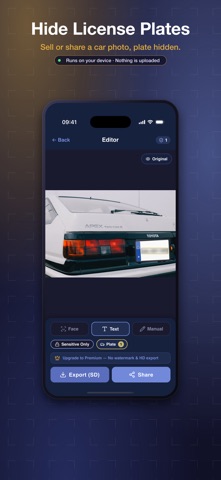
BLUR NUMBER PLATES Number plates are recognised and hidden in one step. Useful before you post a car for sale, share a dash-cam or accident photo, or upload anything taken in a car park.
HIDE IBAN, CARD AND ID NUMBERS Bank account numbers, IBANs, credit card numbers and national ID numbers in a receipt, bank statement or document photo are recognised and blurred, so you can share the image without exposing the account.
HIDE PHONE NUMBERS AND E-MAILS Phone numbers and e-mail addresses in a chat screenshot, a scanned page or a photographed sign are found and blurred, so contact details do not travel with the image. Numbers from every country are supported.
CENSOR ONLY THE SENSITIVE PARTS, OR ALL TEXT Choose between covering just the risky details and blurring every piece of text in the image when a whole document should be unreadable. Draw your own blur over anything else with a finger: a name, a logo, a street sign.
CHECK, THEN SAVE OR SHARE Tap any detected box to blur or unblur it, hold to compare with the original, then save the blurred copy to your gallery or send it straight to any messaging or social app. The original photo stays untouched.
BLUR FROM ANY APP Open a photo in any app, tap Share and choose Auto Blur. The safe version is ready to send back in a few seconds.
WHEN YOU NEED AUTO BLUR - Sharing photos of your kids: post the moment, not your child's face - Selling a car: hide the number plate in every listing photo - Posting a screenshot: blur phone numbers, e-mails and names in a chat - Sending a receipt or invoice: cover the IBAN, card number or ID number - Street, event and travel photos: make strangers unrecognisable - Property, classroom and workplace photos: blur visitors, students and colleagues
KEY FEATURES - Automatic face detection and face blur - Number plate detection and blur - IBAN, credit card and national ID number detection - Phone number and e-mail address detection, all countries - Sensitive-only or all-text mode - Manual blur: draw over anything with a finger - Tap any box to toggle it, hold to compare with the original - Pinch to zoom for precise edits - Save to gallery or share directly, original untouched - Receive photos from the share menu of any app - Works offline, in more than 70 languages
PRIVACY FIRST Face detection, text recognition and blurring all run on your device. Your photos never reach a server, there is no account and no cloud, and the app keeps working without an internet connection. The blur is baked into the saved copy, so whoever receives it cannot recover what was underneath.
FREE, NO ADS Detecting and blurring is free with no limit and no ads. An optional one-time Premium purchase removes the small watermark and exports at full resolution.
Zo beoordelen mensen de app
Log in om deze app te beoordelen. Eerlijk is wat telt.
Nog geen beoordelingen. Heb je de app geprobeerd? Beoordeel hem als eerste.
Meer apps in Foto en video
Beste nieuwe apps in Foto en video van deze week Zoetrope ViewerWatch your zoetrope records and slipmats animate through your camera, or live on your…
 Migumento · QR photo albumOne album for every guest
- ScreenLux: Live Wallpapers 4KLive wallpapers for iPhone and 4K video wallpapers for Android
 ChromaSolChromaSol looks at a photo, isolates the people in it, leaves skin out and reduces the…
 Vinette: Sticker JournalFor the person who finds rest in decorating
 IROZOUIROZOU is a color workspace made for designers: fashion, textile, graphic and product…