
Duopress: Photo Collage Maker
Niet geclaimdMake a photo collage in a minute and keep it for good
Door vuong cuong · Foto en videoWaarom we dit verwachten: Duopress offers a rich free collage toolkit with clear value, no watermarks, and broad appeal for everyday photo sharing.




Over deze app
Make a photo collage in a minute and keep it for good. Save and share with no watermark, ever.
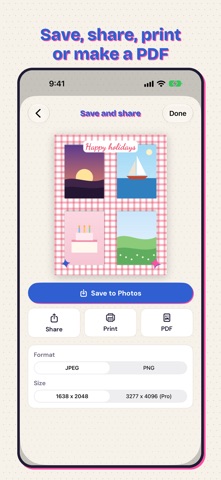
Pick your photos and Duopress lays them out. Then make it yours: swap and reframe photos, change the spacing and corners, add text and stickers, cut a person or a pet out of a photo, and save it to Photos, share it, print it or make a PDF.
GRIDS AND FREESTYLE - 100 layouts for 1 to 16 photos, plus heart, star, circle, hexagon, arch and blob shaped grids - Drag the lines between photos to resize any grid, or shuffle the photos - Spacing and corner sliders, fit or fill, drag to reframe, pinch to zoom - Press and hold to swap two photos; drag one off the edge to remove it - Freestyle: scatter up to 30 photos anywhere on the canvas - Sizes for feeds, stories, 3:4, photo strips, 4x6, 5x7, 8x10, A4 and Letter - Carousels and profile grids that save as separate posts, in order
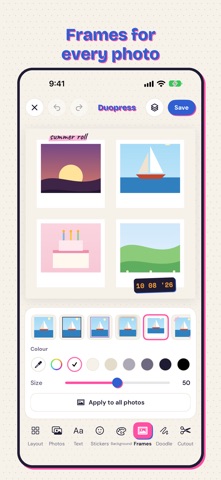
FRAMES - 12 frame styles for every photo: instant, film, torn paper, stamp, tape, photo corners and more - Frame a single photo on a soft blur of itself, in any size
CUTOUTS - Auto finds the person, pet or object and lifts it out - Scissors to draw around anything, shapes for hearts, stars and circles - Refine the edges with a brush, then add a white sticker edge
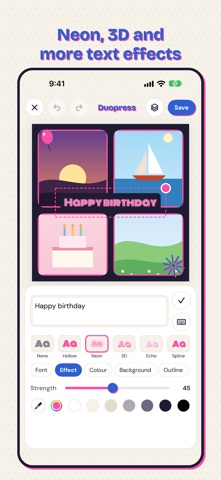
TEXT, STICKERS AND DOODLES - 36 fonts, 36 text styles, outlines, shadows, labels, curved and vertical text - Text effects: hollow, neon, 3D, echo, splice and gradient - 400 original stickers in 20 packs, drawn in two printing inks - Doodle with a pen, marker or highlighter; pick any color from the canvas
PHOTO EDITS - One-tap Auto, crop, straighten, 14 adjustments with grain and glow, 40 filters and 14 overlays - Copy a photo's look and paste it onto the others - Apply one filter or border to every photo at once
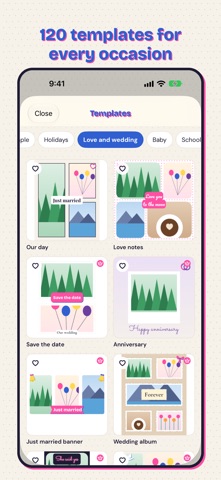
BACKGROUNDS AND TEMPLATES - Colors, 24 gradients, 84 patterns, your own photo or a blur of one, or transparent for a PNG - 120 templates for birthdays, weddings, babies, holidays, trips, before and after, mood boards and more
NOTHING GETS LOST Every collage saves as you go. Close it and pick up again from Home whenever you like.
YOUR PHOTOS STAY YOURS Everything happens on your device. No account, no upload, no cloud. Duopress picks photos with the system picker, so it never needs access to your library, and asks only to add your finished collage to Photos.
RUNS ON IOS 15 Works on iPhone 6s and newer, and on iPad, in every orientation and in Split View. Auto cutout of pets and objects is best on iOS 17.
NO ADS, ONE PRO PURCHASE, NO SUBSCRIPTION Duopress has no ads and never tracks you. Pro is a single purchase, shared with your family: every sticker pack, pattern, frame style, template and font, and Large 4096 pixel export. You can try Pro items in any collage first.
Zo beoordelen mensen de app
Log in om deze app te beoordelen. Eerlijk is wat telt.
Nog geen beoordelingen. Heb je de app geprobeerd? Beoordeel hem als eerste.
Meer apps in Foto en video
Beste nieuwe apps in Foto en video van deze week Zoetrope ViewerWatch your zoetrope records and slipmats animate through your camera, or live on your…
 PlanIt Earth: VR Photo PlannerFor landscape, travel, nature, cityscape, night, time-lapse, star-trail, Milky Way and…
 TonalierYour photos now have an editor
 Superblur: Mosaic & Blur FacesSuperblur hides faces, number plates, names and addresses in your photos and videos…
 SqizziKeep the memories
 Photo Widget: Crop & PositionShow your favorite photos on your Home Screen — exactly the way you want