
Jimakuru: Auto Captions
Niet geclaimdJimakuru adds captions to your videos
Door reiji onishi · Foto en videoWaarom we dit verwachten: Strong on-device captioning with rich styling, face-aware placement and vertical text makes it a compelling video tool.




Kort samengevat
Jimakuru: Auto Captions transcribes the speech in a video on your iPhone or iPad and turns it into editable captions, with 24 styles, 70+ fonts, translation, and export as burned-in video or SRT file. It suits anyone who makes videos and wants captions without uploading footage. A notable point is that all processing stays on the device and the app is free, with ads and no watermark on exports.
Samenvatting door Debuts, gebaseerd op de vermelding in de App Store.Over deze app
Jimakuru adds captions to your videos.
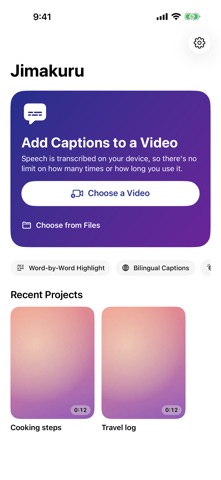
■ Transcribed on your device Pick a video and the speech is turned into text on your iPhone, then split into easy-to-read captions. Nothing is uploaded, so there are no limits on how many videos or how long they are. Works with English, Spanish, French, German, Italian, Portuguese, Japanese, Chinese, Korean and many more languages.
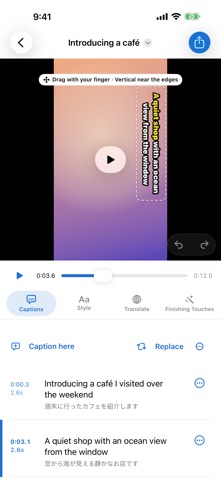
■ Fix anything in place Tap a caption to edit it. Split, merge, nudge the timing, snap it to the current frame, or replace a misheard name everywhere at once. Undo and redo included.
■ 24 styles and 70+ fonts Classic, karaoke and bold telop, plus cute captions like dreamy pastel, sticker, candy and neon, and eye-catching ones with gradients and offset shadows. Mix fonts, colors, gradients, double outlines, shadows, rounded boxes and letter spacing freely, and save your look as the default for new videos. Highlight each word as it is spoken and emphasize key words automatically.
■ Drag to move, push to the edge for vertical text Drag captions on the video and pinch to resize. Push a caption against the right or left edge and it turns vertical. You can also change the position, direction, look and timing of a single caption.
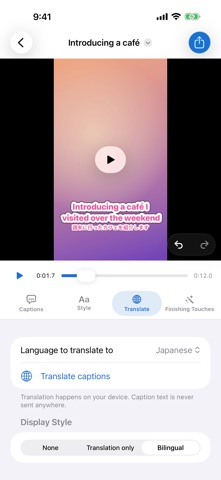
■ Bilingual captions Translate captions on your device and show only the translation, or the translation in small text under the original.
■ Sound captions and face-aware placement Applause, laughter and music become captions like [Applause]. Where a caption would cover a face, it moves out of the way automatically.
■ Trim and tighten Keep as many parts of the video as you like. Remove silent gaps and filler words such as "um" and "uh" automatically for a snappier video. Captions move with the cuts.
■ Vertical, square or wide Turn a landscape video into 9:16, 1:1, 4:5 or 16:9. Nothing is cropped: the whole frame stays visible and the empty space is filled with a blurred copy of the video or black.
■ Export Video with captions burned in (HEVC / H.264, original quality), SRT caption file or text transcript. Unless you change the shape, vertical videos stay vertical.
■ Free, no watermark All features are free. No watermark on your exports. To cover running costs, the app shows a small ad at the bottom of the screen, an ad while loading or exporting, and a full-screen ad at most once a day after an export. Audio and video are processed entirely on your device and never sent anywhere.
--- Requires iOS 26.0 or later (iPhone and iPad) Support: rei12jii@gmail.com
Zo beoordelen mensen de app
Log in om deze app te beoordelen. Eerlijk is wat telt.
Nog geen beoordelingen. Heb je de app geprobeerd? Beoordeel hem als eerste.
Meer apps in Foto en video
Beste nieuwe apps in Foto en video van deze week Zoetrope ViewerWatch your zoetrope records and slipmats animate through your camera, or live on your…
 Migumento · QR photo albumOne album for every guest
 PlanIt Earth: VR Photo PlannerFor landscape, travel, nature, cityscape, night, time-lapse, star-trail, Milky Way and…
 TonalierYour photos now have an editor
 Superblur: Mosaic & Blur FacesSuperblur hides faces, number plates, names and addresses in your photos and videos…
 SqizziKeep the memories