
Scrollloom: Long Screenshots
Niet geclaimdTurn a screen recording of a steady scroll into one long screenshot, right on your iPhone
Door Rakesh Gupta · Foto en video


Kort samengevat
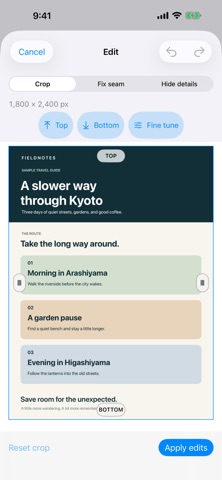
Scrollloom: Long Screenshots turns a screen recording of a steady vertical scroll into one continuous long image on an iPhone. It suits people who want to capture a full web page or chat thread in a single picture, and it processes recordings on the device, with options to crop, fix seams, hide private details, and save a PNG. One notable point is that it does not upload recordings to a Scrollloom server.
Samenvatting door Debuts, gebaseerd op de vermelding in de App Store.Over deze app
Turn a screen recording of a steady scroll into one long screenshot, right on your iPhone.
Choose a recent screen recording or pick a video from Photos. Trim away Control Center and other unwanted moments before stitching. Scrollloom finds the overlap between frames and creates one continuous image.
Make it yours before sharing: • Crop the top, bottom, and sides directly on the image. • Fix a visible seam when a page shifts during recording. • Hide private details with opaque blocks. • Save a PNG to Photos or Files, or share it with another app. • Reopen your latest editable result without using another generation.
Your recording and finished screenshot are processed on your device. Scrollloom does not upload them to a Scrollloom server.
Make two long screenshots free each day. After that, watch a rewarded ad to unlock one more screenshot whenever an ad is available, or subscribe to Scrollloom Pro for unlimited screenshots without ads. Subscription terms and the local price are shown before purchase.
For best results, record one continuous vertical scroll at a steady pace. Choose a clip of 90 seconds or less.
Terms of Use (EULA): https://www.apple.com/legal/internet-services/itunes/dev/stdeula/
Zo beoordelen mensen de app
Log in om deze app te beoordelen. Eerlijk is wat telt.
Nog geen beoordelingen. Heb je de app geprobeerd? Beoordeel hem als eerste.
Meer apps in Foto en video
Beste nieuwe apps in Foto en video van deze week Zoetrope ViewerWatch your zoetrope records and slipmats animate through your camera, or live on your…
 Migumento · QR photo albumOne album for every guest
 PlanIt Earth: VR Photo PlannerFor landscape, travel, nature, cityscape, night, time-lapse, star-trail, Milky Way and…
 TonalierYour photos now have an editor
 Superblur: Mosaic & Blur FacesSuperblur hides faces, number plates, names and addresses in your photos and videos…
 SqizziKeep the memories