
Light Right - Film Light Meter
NieodebranaLight Right turns your iPhone into a reflected-light meter for manual film cameras
Twórca: Jonathan Underwood · Zdjęcia i wideoDlaczego tak przewidujemy: Its clear description and camera-specific profiles make the value obvious for film photographers without a working meter.



O aplikacji
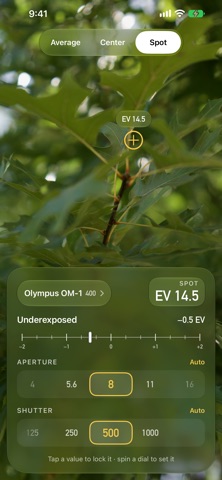
Light Right turns your iPhone into a reflected-light meter for manual film cameras. Point it at the scene, choose what to expose for, and read the aperture and shutter speed off two dials. Then set them on the camera in your other hand.
It is made for the bodies that have no meter, or one you no longer trust: rangefinders, TLRs, medium format, and old SLRs whose cells gave up years ago.
METER THE WAY YOU SHOOT • Average, Center, or Spot. Spot reads a small area wherever you tap, so you can meter the shadow or the face rather than the sky. • Two dials, each on Auto or locked. Lock the aperture and the meter gives you the shutter speed; lock the shutter and it gives you the aperture. Lock both and a viewfinder needle shows how far off you are. • Hold. Tap the reading, or press a volume button or Camera Control, to freeze it, picture and all. Then turn to the camera and set it at leisure. • Settling. While the phone is still adjusting after you re-aim, the reading says so, so you know when it is worth holding. • Long exposures on B. Past the slowest marked speed, the shutter dial carries on to 60 seconds for bodies with a bulb setting.
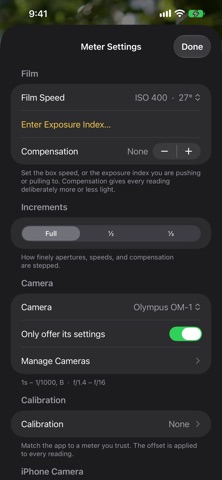
SET UP FOR YOUR CAMERA • Camera profiles hold results to the speeds and apertures actually engraved on your body. Ten classic cameras are included, from the Olympus OM-1 and Nikon FM2 to the Hasselblad 500C/M and an early Rolleiflex with its irregular Compur dial. Duplicate one to match your own lens, or build your own from scratch. • Film speeds from ISO 12 to 6400, or any exposure index you are pushing or pulling to. • Full, half, or third stops. • Exposure compensation up to ±5 stops.
MATCH A METER YOU TRUST A phone's camera is tuned to make pleasing photographs, not to the standard a handheld meter is built around. Point Light Right and a meter you trust at the same grey card, enter what that meter says, and the offset is applied to every reading from then on. It is worth doing once.
HONEST ABOUT THE NUMBERS Apertures and speeds are worked out at their exact positions and only shown as the numbers marked on your camera. f/11 is really f/11.3 and 1/60 is really 1/64, so the rounding on the dials never adds up to an error that isn't there.
PRIVATE BY DESIGN Light Right reads the light through the camera. Nothing is photographed, saved, or sent anywhere. There is no account, no ads, no tracking, and no subscription.
FREE, WITH A TIP JAR Light Right is free. If it helps you get an exposure right, there is an optional tip jar at the bottom of Settings. Tips unlock nothing and are entirely up to you.
Light Right is a reflected-light meter. It does not do incident or flash metering, which a phone cannot do properly without extra hardware.
Oceny użytkowników
Zaloguj się, aby ocenić tę aplikację. Liczy się szczerość.
Brak ocen. Znasz tę aplikację? Oceń ją jako pierwszy.
Więcej aplikacji z kategorii Zdjęcia i wideo
Najlepsze nowe aplikacje z kategorii Zdjęcia i wideo w tym tygodniu Zoetrope ViewerWatch your zoetrope records and slipmats animate through your camera, or live on your…
 Migumento · QR photo albumOne album for every guest
 PlanIt Earth: VR Photo PlannerFor landscape, travel, nature, cityscape, night, time-lapse, star-trail, Milky Way and…
 TonalierYour photos now have an editor
 Superblur: Mosaic & Blur FacesSuperblur hides faces, number plates, names and addresses in your photos and videos…
 SqizziKeep the memories