
Putty Buddy
NieodebranaCreate 3D models with your fingertips
Twórca: Brian McIntosh · Zdjęcia i wideoDlaczego tak przewidujemy: The description clearly explains seven sculpting brushes, export formats, and a no-subscription model that appeals to hobbyist sculptors.

W skrócie
Putty Buddy is a 3D sculpting app with seven brushes, digital clay, and STL and OBJ export through the Files app. It suits people who want to shape characters, creatures, or abstract forms from built-in starting shapes. One purchase unlocks all tools and export formats, with no subscriptions, ads, or account required.
Podsumowanie Debuts na podstawie karty aplikacji w App Store.O aplikacji
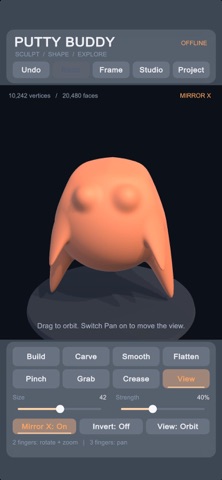
Create 3D models with your fingertips. Putty Buddy brings 3D sculpting and modeling to your device, with digital clay, seven sculpting brushes, and STL and OBJ export through the Files app.
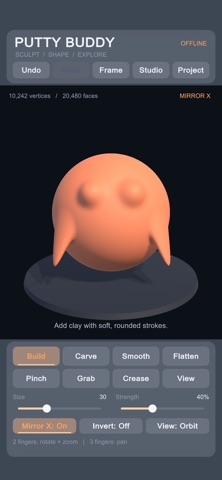
Shape characters, creatures, and abstract sculptures. Pull out ears, carve a face, smooth a surface, or sharpen a ridge. Start with a simple shape and develop it into something of your own.
One purchase includes every sculpting tool, material option, saving feature, and export format. No subscriptions, ads, or account required.
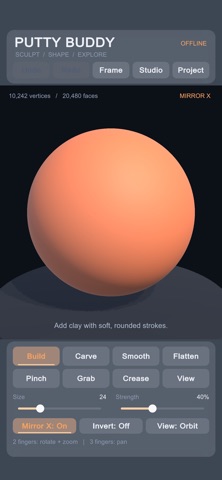
• Seven sculpting brushes Build adds volume. Carve removes it. Smooth softens bumps, Flatten levels surfaces, Pinch sharpens ridges, Grab pulls shapes outward, and Crease creates defined grooves.
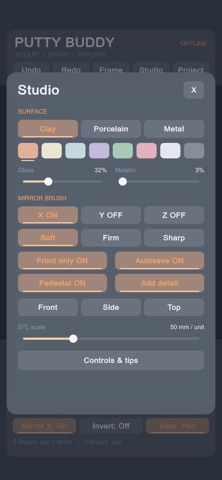
• Adjustable brushes and symmetry Control brush size, strength, and falloff for broad shaping or finer details. Reverse supported brushes with Invert. Mirror strokes across the X, Y, or Z axes to create symmetrical faces, characters, and forms.
• Starting shapes and mesh detail Begin with a sphere, egg, or rounded block. Choose your starting mesh detail and subdivide the surface with Add Detail as your sculpture develops.
• Colors and material finishes Choose from eight colors and clay, porcelain, or metallic appearances. Adjust gloss and metallic settings to explore different finishes.
• Touch navigation Rotate, pan, and pinch to zoom. Switch to front, side, or top views, or center your sculpture with a tap.
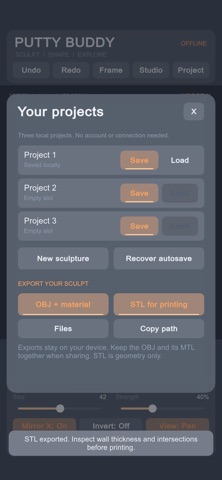
• Local projects, undo, and autosave Undo and redo edits as you experiment. Save and reopen three local projects, with autosave and backup recovery. Work offline with projects stored on your device.
• OBJ + MTL export Take your sculpture into compatible 3D software. OBJ export includes mesh geometry and surface normals. The accompanying MTL file stores the base color and basic material settings. Keep both files together when transferring your model.
• STL export for 3D printing workflows Export binary STL files with adjustable scale in millimeters. STL contains geometry only, without color or materials. Check your model’s wall thickness and intersections in your preferred preparation or slicing software before printing.
Access exported files through the Files app to copy, share, or transfer them.
Oceny użytkowników
Zaloguj się, aby ocenić tę aplikację. Liczy się szczerość.
Brak ocen. Znasz tę aplikację? Oceń ją jako pierwszy.
Więcej aplikacji z kategorii Zdjęcia i wideo
Najlepsze nowe aplikacje z kategorii Zdjęcia i wideo w tym tygodniu Zoetrope ViewerWatch your zoetrope records and slipmats animate through your camera, or live on your…
 Migumento · QR photo albumOne album for every guest
 PlanIt Earth: VR Photo PlannerFor landscape, travel, nature, cityscape, night, time-lapse, star-trail, Milky Way and…
 TonalierYour photos now have an editor
 Superblur: Mosaic & Blur FacesSuperblur hides faces, number plates, names and addresses in your photos and videos…
 SqizziKeep the memories