
SartorX
NieodebranaUpload forms are picky
Twórca: Cem Cakmakci · Zdjęcia i wideoDlaczego tak przewidujemy: A clearly useful, privacy-first utility that solves a real everyday frustration with thorough, honest descriptions and a focused audience.



W skrócie
SartorX converts a photo to the format, pixel size and file size that an upload form requires, working from typed text, a scanned page, a screenshot or a preset. It is aimed at people who need to meet a form's photo rules, such as visa, passport or application images. One point stands out: all processing happens on the iPhone, and photos are never uploaded.
Podsumowanie Debuts na podstawie karty aplikacji w App Store.O aplikacji
Upload forms are picky. "JPG only. Max 300 KB. 600 × 600 pixels." SartorX converts your photo to what the form asks for: the format, the pixel size and the file size.
TELL IT THE RULE • Type or paste the requirement as the form words it. SartorX reads the format, the pixel size and the size limit out of it. • Or scan it: point the camera at the page, or pick a screenshot or a PDF. • Or start from a preset, such as a visa or passport photo, an application photo, a signature scan, a product image or an email-friendly size. Presets are starting points, not guarantees: official rules change, so check the official source before you submit.
SEE IF IT FITS BEFORE YOU CONVERT • A forecast shows which photos fit cleanly and about how large the result will be. • When a photo can't meet the size limit and the pixel size together, SartorX shows you the options and you choose. • A photo that already meets the rule is not compressed again.
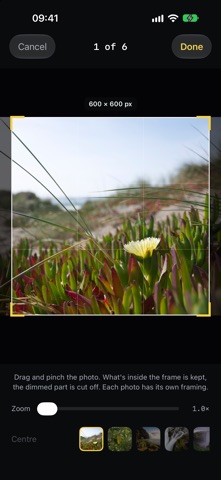
GET THE NUMBER RIGHT • JPEG, PNG or HEIC. • A file size limit in KB or MB, or a range such as 20–50 KB. • Exact pixel dimensions, with a crop frame you position per photo. • A white background, when the form wants one. • Removal of location data from the file.
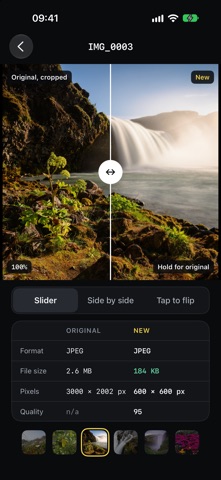
CHECK THE RESULT • Compare the original and the new file with a slider, side by side, or tap to flip. • See format, file size, pixels and quality for both. • Save to Photos or share. Your originals are not changed.
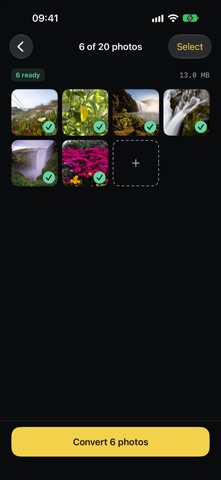
UP TO 20 PHOTOS AT ONCE Convert a batch to the same target, and use the share sheet to send photos to SartorX from Photos or any other app.
PRIVATE BY DESIGN • Everything is done on your iPhone. Photos are not uploaded. • No account, no ads, no analytics, no tracking. • SartorX keeps only your settings, your own presets and a history of targets, not your photos.
Oceny użytkowników
Zaloguj się, aby ocenić tę aplikację. Liczy się szczerość.
Brak ocen. Znasz tę aplikację? Oceń ją jako pierwszy.
Więcej aplikacji z kategorii Zdjęcia i wideo
Najlepsze nowe aplikacje z kategorii Zdjęcia i wideo w tym tygodniu Zoetrope ViewerWatch your zoetrope records and slipmats animate through your camera, or live on your…
 PlanIt Earth: VR Photo PlannerFor landscape, travel, nature, cityscape, night, time-lapse, star-trail, Milky Way and…
 TonalierYour photos now have an editor
 Superblur: Mosaic & Blur FacesSuperblur hides faces, number plates, names and addresses in your photos and videos…
 SqizziKeep the memories
 Photo Widget: Crop & PositionShow your favorite photos on your Home Screen — exactly the way you want