
Lonto - Long Screenshots
Não reivindicadaTurn overlapping screenshots or a scrolling screen recording into a continuous image
Por 都 李 · Fotografia e vídeo


Em resumo
Lonto - Long Screenshots stitches overlapping screenshots or a scrolling screen recording into one continuous image, so chats, articles, and posts can be saved and shared together. It is aimed at people who need to capture long on-screen content in a single picture. One notable feature is an optional ad-removal step for supported article layouts, with a preview before export.
Resumo do Debuts, com base na ficha da App Store.Sobre
Turn overlapping screenshots or a scrolling screen recording into a continuous image. Keep chats, articles, and posts together, ready to save and share.
Stitch screenshots for free
Choose overlapping screenshots of the same content. Lonto connects them and removes repeated sections. Save and share for free, with no paid quality upgrade. Each export includes the Lonto icon and “Made with Lonto” below your content, without covering it.
Turn recordings into long screenshots
Record as you scroll, import the video, and select the section you want to keep. Preview the result before exporting with Pro. You control the scrolling; Lonto does not operate other apps for you.
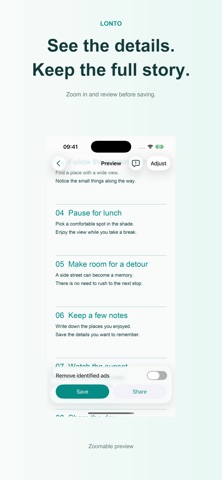
Keep the content, remove identified ads
For supported article layouts, optionally remove ad blocks with clear boundaries. Compare the preview before exporting. Uncertain areas stay intact, and content missing from your source is not invented.
Preview first. Buy Pro once.
Save and share stitched screenshots for free in the main app, with a “Made with Lonto” footer. Lonto Pro exports do not include this footer, and Pro includes the Make Long Screenshot extension. Preview recording conversion and source-ad removal for free; exporting those results requires Pro. One-time purchase. No subscription. No in-app ads.
Check the content and joins before saving. Missing content, changing screens, or overlays can affect the result.
Terms of Use: Apple Standard End User License Agreement (EULA) https://www.apple.com/legal/internet-services/itunes/dev/stdeula/
Privacy Policy https://lonto.pages.dev/en/privacy/
A avaliação das pessoas
Inicia sessão para avaliares esta aplicação. O que conta é seres sincero.
Ainda sem avaliações. Já a experimentaste? Sê o primeiro a avaliar.
Mais apps de Fotografia e vídeo
As melhores apps novas de Fotografia e vídeo desta semana Zoetrope ViewerWatch your zoetrope records and slipmats animate through your camera, or live on your…
 Migumento · QR photo albumOne album for every guest
 PlanIt Earth: VR Photo PlannerFor landscape, travel, nature, cityscape, night, time-lapse, star-trail, Milky Way and…
 TonalierYour photos now have an editor
 Superblur: Mosaic & Blur FacesSuperblur hides faces, number plates, names and addresses in your photos and videos…
 SqizziKeep the memories