
mSeal - Batch Watermark
Not claimedProtect your photos before you post them
By Tran Thanh · Photo and videoWhy we expect it: Clear, practical value for shops and creators, with a well-organized description, privacy focus, and a convenient one-tap workflow for batch watermarking.



In short
mSeal - Batch Watermark adds text or a logo to many photos at once, from a single photo up to a whole album, and saves the watermarked copies to a separate album while leaving originals untouched. It is aimed at shops and creators who want to protect their images before posting. One notable point is Smart Placement, which moves the watermark away from faces and the main subject, and all processing stays on the device.
Summary by Debuts, based on the App Store listing.About
Protect your photos before you post them. mSeal adds your name, shop info or logo to one photo, a hundred photos, or a whole album with a single tap on Apply.
ONE TAP, ANY NUMBER OF PHOTOS • Pick photos or a whole album, tap Apply, done • Watermark straight from the Photos app via the share sheet • Automate it with Shortcuts and Siri
YOUR ORIGINALS STAY SAFE • mSeal never edits your original photos • Watermarked copies are saved into a separate "mSeal" album, one folder per batch
LOOKS RIGHT ON EVERY PHOTO • Sizes scale with each photo, so one template looks the same on portrait, landscape and square shots • Smart Placement moves the watermark away from faces and the main subject • Export presets for Facebook, Instagram and chat apps keep text sharp after compression
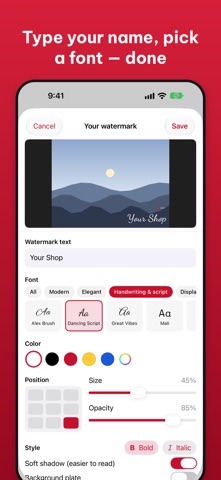
MADE FOR SHOPS AND CREATORS • Ready-made templates: shop name + hotline, product numbers (SP001, SP002…), signature, copyright, anti-theft tile, camera info frame • Date, time and GPS location stamps • 13 beautiful fonts including handwriting and script styles, or import your own • Text, logo (PNG with transparency, white-background removal) and a simple multi-layer designer • Single, tile, multi-corner and border layouts
PRIVATE BY DESIGN • Everything runs on your device — your photos are never uploaded • Remove GPS data from exported photos with one switch
MSEAL PRO (ONE-TIME PURCHASE) • Unlimited photos per batch and unlimited templates • Tile, multi-corner and border layouts, Smart Placement • All dynamic tokens (product numbers, EXIF, GPS), Shortcuts, custom fonts • No ads The free version shows ads and is limited to 10 photos per batch and 2 templates.
Terms of Use: https://www.apple.com/legal/internet-services/itunes/dev/stdeula/ Privacy Policy: https://www.monikstudio.com/privacy-policy
People rate it
Sign in to rate this app. Honest is what counts.
No ratings yet. Tried it? Be the first to rate it.
More Photo and video apps
Best new Photo and video apps this week Zoetrope ViewerWatch your zoetrope records and slipmats animate through your camera, or live on your…
 PlanIt Earth: VR Photo PlannerFor landscape, travel, nature, cityscape, night, time-lapse, star-trail, Milky Way and…
 TonalierYour photos now have an editor
 Superblur: Mosaic & Blur FacesSuperblur hides faces, number plates, names and addresses in your photos and videos…
 SqizziKeep the memories
 Shoo: Swipe Photo CleanerThousands of photos and running out of space?