
Maxemarker
Nicht beanspruchtMaxemarker turns your iPhone or iPad into a marker remote for your ATEM switcher
Von Mustafa Morad · Foto und Video


Kurz gesagt
Maxemarker turns an iPhone, iPad or Apple Watch into a remote for placing timecode-accurate markers on an ATEM switcher recording. It is aimed at video producers who edit in DaVinci Resolve, since a bundled script places the markers on clips in the project. One standout feature is camera sync, which matches a photographed camera timecode display with the ATEM timecode.
Zusammenfassung von Debuts, basierend auf dem Eintrag im App Store.Info
Maxemarker turns your iPhone or iPad into a marker remote for your ATEM switcher. While recording, tap big colored buttons – highlight, flub, retake, cut – and every marker gets the switcher's exact timecode. Afterwards the markers sit frame-accurately on your clips in the DaVinci Resolve project the ATEM recorded.
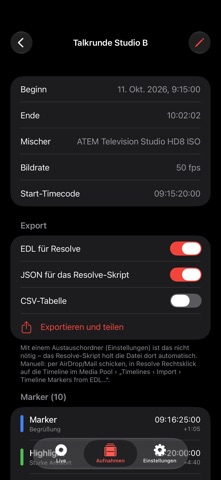
HOW IT WORKS • Connect: over Wi‑Fi or directly with an Ethernet adapter – even in closed client networks. • Mark: rename and recolor the buttons, long-press to add a note, undo with one tap. • Transfer: the app keeps the marker file up to date in a folder (iCloud Drive, OneDrive, Dropbox, Google Drive or a network share). The Resolve script for Mac and Windows – included with the app – picks it up there and places the markers.
APPLE WATCH • Place markers right from your wrist – with the same buttons as on your iPhone • Double tap with thumb and index finger places the first button (Apple Watch Series 9 and Ultra 2 or later) • A short tap on the wrist confirms each marker, buttons can be large or full screen • Markers land exactly where you tapped – even if the connection drops for a moment
IN DAVINCI RESOLVE • Markers on the clips – they move along as you edit • Optionally also on the timeline and on the source clips • Real multicam timeline from the ATEM project, cut like your live edit • Replace ATEM ISO recordings with camera originals via timecode
FASTER MARKING • Range button: tap start and end, or simply press and hold – one marker with a duration in Resolve • Voice markers: hold and speak – the text becomes the note • Undo and redo, step by step back to the first marker • Bluetooth foot pedal and keyboard, Shortcuts, Siri and the Action button • Live Activity on the Lock Screen and in the Dynamic Island • YouTube chapters from your markers – ready for the video description
CAMERAS WITHOUT TIMECODE • Camera sync: photograph the timecode on a camera display – the app matches it with the ATEM timecode and the Resolve script lines up the originals • Drone button: tap it when the drone starts recording – the files land in sync in their camera angle, even without any timecode
AUDIO, RESTARTS AND JOINING • Audio recorder without timecode: the script lines up the audio frame-accurately by its waveform • Camera originals are aligned frame-accurately using their own audio • ATEM lost power? Join several ATEM projects into one timeline – with all markers; the app detects the timecode jump on restart • Clear script window with tabs that updates itself
MORE • Timecode in all common frame rates, including drop frame • Reaction time compensation: place markers a few frames earlier automatically • Export as EDL, JSON and CSV • Network check shows whether the switcher is reachable • Mode without ATEM: set markers even without a switcher • No sign-up, no tracking – your data stays with you
REQUIREMENTS An ATEM switcher with recording, e.g. ATEM Mini Pro ISO, ATEM Mini Extreme ISO, ATEM SDI Extreme ISO or ATEM Television Studio HD8 ISO. For the watch app: Apple Watch with watchOS 10 or later. The Resolve script needs DaVinci Resolve Studio; with the free version you can import the markers as EDL. The script comes with the app (Settings › Sync with Resolve). Guide: maxemarker.maxecute.de
ATEM, DaVinci Resolve and Blackmagic Design are trademarks of Blackmagic Design Pty. Ltd. Maxemarker is an independent product by maxecute and is not affiliated with Blackmagic Design.
Nutzer bewerten sie
Melde dich an, um diese App zu bewerten. Ehrlichkeit zählt.
Noch keine Bewertungen. Hast du die App ausprobiert? Gib die erste Bewertung ab.
Mehr Foto und Video-Apps
Die besten neuen Foto und Video-Apps dieser Woche Zoetrope ViewerWatch your zoetrope records and slipmats animate through your camera, or live on your…
 PlanIt Earth: VR Photo PlannerFor landscape, travel, nature, cityscape, night, time-lapse, star-trail, Milky Way and…
 TonalierYour photos now have an editor
 Superblur: Mosaic & Blur FacesSuperblur hides faces, number plates, names and addresses in your photos and videos…
 SqizziKeep the memories
 Shoo: Swipe Photo CleanerThousands of photos and running out of space?