
HEIC to JPG & PDF Convert
Non revendiquéeGot HEIC photos that won't open on a laptop, a website form or a friend's phone?
Par Mustafa Yasin Senturk · Photo et vidéoPourquoi nous l'attendons : Clear problem, private on-device conversion and thoughtful privacy controls make this a promising utility.


En bref
HEIC to JPG & PDF Convert turns HEIC photos into JPG, PNG or PDF entirely on the device, with no upload and no internet connection needed. It suits people who need photos to open on other computers, websites or phones, and supports batches of up to 60 photos. One notable feature is an option to remove location data from photos while keeping the date taken.
Résumé par Debuts, d'après la fiche de l'App Store.À propos
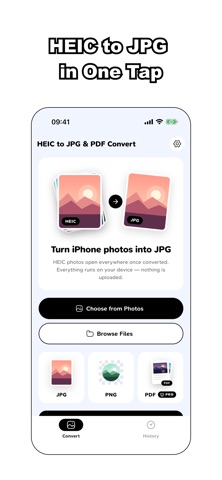
Got HEIC photos that won't open on a laptop, a website form or a friend's phone? Turn them into JPG right on your device — nothing is uploaded, and it works without an internet connection.
Pick your photos, choose the output, tap Convert. Save the results to Photos or share them in one go.
CONVERT THE WAY YOU NEED • JPG for small files that open everywhere • PNG when you want lossless output • PDF: merge several photos into one document, drag to set the page order, choose A4 or Letter
CONTROL SIZE AND QUALITY • Quality slider from smaller to sharper • Resolution: Original, Large or Medium • See the real output size of your first photo and an estimate for the whole batch before you start
KEEP YOUR LOCATION PRIVATE Many phone photos carry the exact GPS spot where they were taken. The app tells you how many of your selected photos contain a location, and lets you choose: • Keep everything • Remove location, keep the date taken • Remove all photo info
BUILT FOR BIG BATCHES Select up to 60 photos at once from Photos or Files, follow the progress of each one, then save or share them together. Files that aren't HEIC are flagged before you convert.
HISTORY Every converted batch stays in the History tab, so you can save or share it again later without converting twice.
PRIVATE BY DESIGN Conversion happens entirely on your device. Your photos are never sent to a server.
FREE & PRO Your first single-photo JPG or PNG conversion is free. After that, you can convert one photo at a time by watching a short optional video ad. Pro unlocks batch conversion, PDF export with page control, unlimited conversions and an ad-free experience.
Pro is an auto-renewing weekly subscription. Eligible new subscribers may start with a 3-day free trial. Payment is charged to your Apple ID account at confirmation of purchase. The subscription renews automatically unless auto-renew is turned off at least 24 hours before the end of the current period. You can manage or cancel it in your App Store account settings.
Need help? https://codevalley.cc/heictojpg-support
Terms of Use (EULA): https://codevalley.cc/heictojpg-terms Privacy Policy: https://codevalley.cc/heictojpg-privacy
Les notes des utilisateurs
Connecte-toi pour noter cette appli. Ce qui compte, c'est d'être honnête.
Pas encore de notes. Tu l'as essayée ? Sois le premier à la noter.
Plus d'apps Photo et vidéo
Les meilleures nouvelles apps Photo et vidéo de la semaine Zoetrope ViewerWatch your zoetrope records and slipmats animate through your camera, or live on your…
 PlanIt Earth: VR Photo PlannerFor landscape, travel, nature, cityscape, night, time-lapse, star-trail, Milky Way and…
 TonalierYour photos now have an editor
 Superblur: Mosaic & Blur FacesSuperblur hides faces, number plates, names and addresses in your photos and videos…
 SqizziKeep the memories
 Shoo: Swipe Photo CleanerThousands of photos and running out of space?