
Oushi
Non revendiquéeOushi is a free tool for revisiting and tidying your photos and videos
Par Zuming Hu · Photo et vidéoPourquoi nous l'attendons : Oushi turns photo clutter into a calm, free review habit, with careful privacy and clear deletion safeguards.



En bref
Oushi is a free photo and video app that opens your library in random or date order so you can revisit media you rarely look at. Swipe to keep, pull down to queue items for deletion, and review the queue, which shows how much space it would free, before anything is removed. It suits people who want to tidy their library at their own pace, and it stands out for keeping originals in place until you confirm.
Résumé par Debuts, d'après la fiche de l'App Store.À propos
Oushi is a free tool for revisiting and tidying your photos and videos. It opens your library at random, bringing back the pictures and clips you rarely look at, and lets you clear out what you don’t want to keep along the way.
Random review, or by date
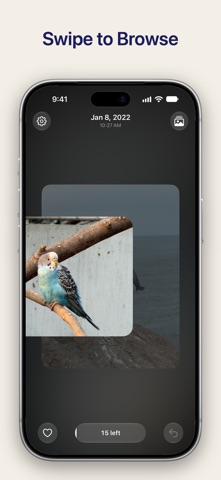
Choose random order, newest first or oldest first. Photos and videos come up together; a video plays in a loop when its card comes up, silent by default, with sound a tap away.
Swipe to keep, pull down to let go
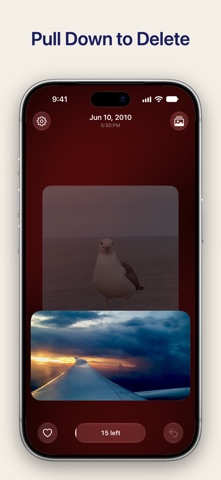
Swipe left or right to keep the current item and see the next one. Pull down to put it in the deletion queue. Changed your mind? Undo any action within the current batch.
Review before deleting
Everything in the deletion queue is shown together, where you can restore or delete a selection, or all of it at once. Until you confirm, the originals stay in your library. The queue also shows how much space the items take up.
At your own pace
Batches hold 15 to 50 items. Your progress is saved on your device, so you can pick up where you left off. Favourite the photos and videos you love; favourites stay in sync with the Photos app.
True to the photo’s colours
The background takes its colour from the photo. On supported devices and systems, HDR photos, HDR videos and Liquid Glass controls are shown in full. Haptic feedback, photo HDR and video HDR each have their own setting.
Optional iCloud sync
Les notes des utilisateurs
Connecte-toi pour noter cette appli. Ce qui compte, c'est d'être honnête.
Pas encore de notes. Tu l'as essayée ? Sois le premier à la noter.
Plus d'apps Photo et vidéo
Les meilleures nouvelles apps Photo et vidéo de la semaine Zoetrope ViewerWatch your zoetrope records and slipmats animate through your camera, or live on your…
 PlanIt Earth: VR Photo PlannerFor landscape, travel, nature, cityscape, night, time-lapse, star-trail, Milky Way and…
 TonalierYour photos now have an editor
 Superblur: Mosaic & Blur FacesSuperblur hides faces, number plates, names and addresses in your photos and videos…
 SqizziKeep the memories
 Shoo: Swipe Photo CleanerThousands of photos and running out of space?