
Ross: Film Presets & Grading
Non revendiquéeRoss gives your photos and videos the look of real film
Par Burak Cakır · Photo et vidéoPourquoi nous l'attendons : The clear film-look value, careful description, and on-device privacy promise make this a promising debut for photo fans.




En bref
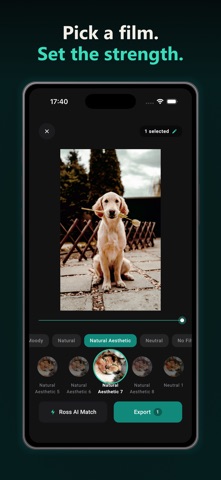
Ross: Film Presets & Grading applies more than 350 film-style presets to photos and short videos, with a strength slider and a press-and-hold view of the original. It is aimed at people who want a film look on their phone, and all processing happens on the device. One standout feature is AI Match, which suggests presets based on the colours and light of a picture.
Résumé par Debuts, d'après la fiche de l'App Store.À propos
Ross gives your photos and videos the look of real film. Pick from 350+ film presets, set how strong the look is, compare it with the original, and save. Everything happens on your phone.
FILM LOOKS IN ONE TAP Swipe through a large collection of presets: black and white, colour slide, cinematic, vintage, creamy, moody, warm and airy, and many more. Each one is built from a colour table, so the look is consistent and smooth on every photo.
BEFORE AND AFTER, AT ANY STRENGTH Drag the strength slider to dial a preset up or down. Press and hold the picture to see the original, then let go to bring the look back. Double-tap to save a preset to your favourites.
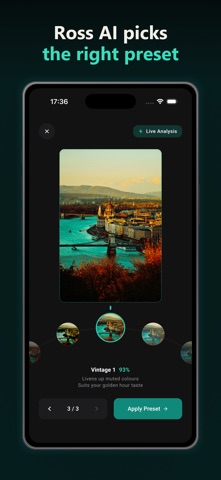
ROSS AI MATCH Not sure which preset suits a photo? AI Match looks at the colours and light of your picture and suggests presets that fit it. Turn the dial or tap a match to preview it, see why it was suggested, then apply it. The analysis runs on your device.
PHOTOS AND VIDEOS Edit a single photo, or pick up to 12 photos and see the same preset on all of them side by side. Change your selection at any time, and take photos out of the batch with one tap. Video clips up to 60 seconds get the same looks: choose a frame, grade it, and export the clip.
SEARCH BY MOOD Describe what you are after, such as "moody rain" or "warm sunset", or browse by atmosphere and tone. Ross finds presets that match, and you can shuffle for something unexpected.
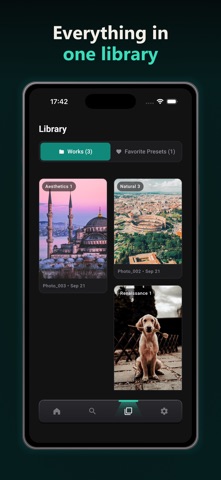
YOUR LIBRARY Every export is saved to your gallery as a new file, and Ross keeps a library of your work and your favourite presets. Your original photos and videos are never changed.
PRIVATE BY DESIGN Your photos and videos never leave your device. There is no account to create and there are no ads. Ross does not upload your pictures anywhere.
FREE TO USE Every preset and every feature, including AI Match, is free. The free version includes 5 exports every 24 hours.
ROSS PRO Remove the export limit with Ross Pro. Choose monthly, yearly (with a 3-day free trial for eligible users) or a one-time lifetime purchase. Subscriptions renew automatically until you cancel them in your Apple Account settings.
MADE FOR EVERYONE Ross is available in English, Turkish, German, French, Spanish, Brazilian Portuguese, Japanese, Korean and Arabic, including full right-to-left layout.
Questions or feedback? Write to galateknoloji@gmail.com.
Les notes des utilisateurs
Connecte-toi pour noter cette appli. Ce qui compte, c'est d'être honnête.
Pas encore de notes. Tu l'as essayée ? Sois le premier à la noter.
Plus d'apps Photo et vidéo
Les meilleures nouvelles apps Photo et vidéo de la semaine Zoetrope ViewerWatch your zoetrope records and slipmats animate through your camera, or live on your…
 PlanIt Earth: VR Photo PlannerFor landscape, travel, nature, cityscape, night, time-lapse, star-trail, Milky Way and…
 TonalierYour photos now have an editor
 Superblur: Mosaic & Blur FacesSuperblur hides faces, number plates, names and addresses in your photos and videos…
 SqizziKeep the memories
 Shoo: Swipe Photo CleanerThousands of photos and running out of space?