
Photo Widget: Crop & Position
Non rivendicataShow your favorite photos on your Home Screen — exactly the way you want
Di Atsushi Ito · Foto e videoPerché ce lo aspettiamo: A thoughtful, privacy-first photo widget with clear value, careful crop controls, and polished screenshots, making it a strong debut for home screen fans.




In breve
Photo Widget: Crop & Position lets people choose which part of each photo appears in Small, Medium, or Large Home Screen widgets, and can show a set of photos in order or shuffled. It suits anyone who wants faces kept in view. Photos stay on the device, with no account, ads, or analytics.
Riepilogo di Debuts, basato sulla scheda dell'App Store.Informazioni
Show your favorite photos on your Home Screen — exactly the way you want. The built-in Photos widget crops photos automatically, often cutting off faces. Here, you choose which part to show.
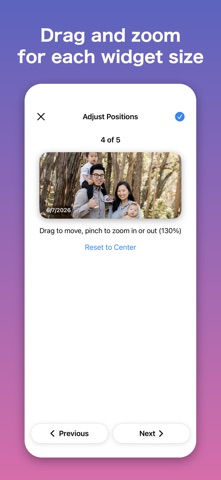
• Show the best part Adjust each photo inside the same frame as your Small, Medium, or Large widget. - Drag to move - Pinch to zoom. You can also zoom out to fit the whole photo (fill the empty space with blur, a solid color, stretched edges, or a color you pick, photo by photo) Even a tall photo in a wide widget keeps faces in view. Choose the photo quality in Settings: Light, Standard, or High. With High, close-ups stay sharp.
• Photo sets, shown one after another Tap + and choose photos to make a photo set. The widget shows the photos in turn. - In Order: in the order you arrange them - Shuffle: in a shuffled order, with no repeats until every photo has been shown Reorder or delete photos with Edit. Photos change on a schedule starting at midnight (iOS may update a little late).
• Date taken, right on the photo Turn on "Show Date Taken" to display the date in the lower-left corner, so you remember when each photo was taken.
• Simple to use Tap +, choose photos, and add the widget to your Home Screen. That's it. The how-to guide is always in the app. You can also choose the text size and switch between English and Japanese in Settings.
• Your photos stay with you No account needed. Photos are stored on your device and never sent to the developer. The App uses the iOS photo picker, so it sees only the photos you choose — never your whole library. No ads, no analytics. You can also lock the App with Face ID.
• Premium (one-time purchase) The basics are free. Premium is a one-time purchase — no subscription. - Unlimited photo sets (free: 3) - Unlimited photos in each set (free: 5) - Choose how often photos change: 1, 3, 6, 9, 12, 24, or 48 hours (free: 24 hours) - Automatic backup of your photo sets and photos to your iCloud (restoring is free) - Tap the widget to show the next photo
• Terms and Privacy Terms of Use (EULA): https://www.apple.com/legal/internet-services/itunes/dev/stdeula/ Privacy Policy: https://daily-apps-showcase.pages.dev/privacy/photo-widget/
Le valutazioni delle persone
Accedi per valutare questa app. Conta essere sinceri.
Ancora nessuna valutazione. L'hai provata? Sii il primo a valutarla.
Altre app di Foto e video
Le migliori nuove app di Foto e video di questa settimana Zoetrope ViewerWatch your zoetrope records and slipmats animate through your camera, or live on your…
 PlanIt Earth: VR Photo PlannerFor landscape, travel, nature, cityscape, night, time-lapse, star-trail, Milky Way and…
 TonalierYour photos now have an editor
 Superblur: Mosaic & Blur FacesSuperblur hides faces, number plates, names and addresses in your photos and videos…
 SqizziKeep the memories
 Shoo: Swipe Photo CleanerThousands of photos and running out of space?