
3DA - 3D Scanner
Niet geclaimdYour space
Door MC Media LLC · Foto en video


Kort samengevat
3DA - 3D Scanner captures rooms and objects on compatible devices, letting users explore them in 3D and share floor plans, measurements and PDF reports. It suits people planning projects such as painting, since it supplies wall dimensions and openings that can be passed to an outside estimate. Scans stay on the device and no account is needed.
Samenvatting door Debuts, gebaseerd op de vermelding in de App Store.Over deze app
Your space. Made shareable.
Capture rooms and objects, explore them in 3D, and share useful views and measurements.
PLAN A PAINT PROJECT Use measured wall dimensions and detected openings to help plan a paint estimate. Share a PDF report with a person or AI app of your choice, then specify which surfaces to paint, coats and the paint's coverage. 3DA supplies scan measurements; estimates come from the person or separate app you choose. Verify dimensions and allowances before buying paint.
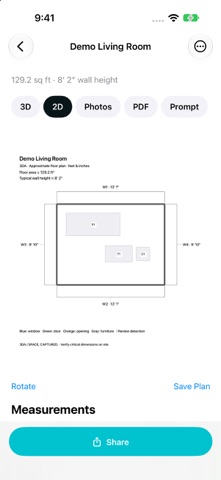
ROOMS Scan a room on a compatible LiDAR device. Explore a representative 3D model and the available captured point cloud. View a floor plan with dimensions in feet and inches or metric units, plus wall and opening measurements.
SHARING Choose a 3D Preview, PDF Report and Compressed Scan Data in one Share panel. See prepared file sizes before sharing. Full Scan Data is optional. Smaller sharing images help keep exports manageable while your original capture files stay on the device.
REPORTS AND PROMPTS Create a PDF with room views, a dimensioned plan, available reference photos and selectable measurements. Edit a prompt in the Prompt tab and choose whether to include it in the PDF. Share selected files using the iOS share sheet.
OBJECTS Use guided Apple Object Capture on supported devices. Review width, depth, height and bounding-box volume, then share a preview, PDF report or scan data.
YOUR CAPTURES Scans are processed and stored on your device. No 3DA account is required. You choose what to export and where to share it. Open supported portable 3DA captures from Files or the Import menu. Request a feature or send feedback from Home through an email draft you review and send.
Room scanning requires a LiDAR-equipped device. Object Capture requires compatible hardware. Measurements are approximate; verify critical dimensions. Room furniture is representative, not a capture of its exact appearance. AI suggestions and paint estimates come from the separate app or person you choose.
Zo beoordelen mensen de app
Log in om deze app te beoordelen. Eerlijk is wat telt.
Nog geen beoordelingen. Heb je de app geprobeerd? Beoordeel hem als eerste.
Meer apps in Foto en video
Beste nieuwe apps in Foto en video van deze week Zoetrope ViewerWatch your zoetrope records and slipmats animate through your camera, or live on your…
 PlanIt Earth: VR Photo PlannerFor landscape, travel, nature, cityscape, night, time-lapse, star-trail, Milky Way and…
 TonalierYour photos now have an editor
 Superblur: Mosaic & Blur FacesSuperblur hides faces, number plates, names and addresses in your photos and videos…
 SqizziKeep the memories
 Shoo: Swipe Photo CleanerThousands of photos and running out of space?