
Image Resizer Pro: Compress
Niet geclaimdResize, compress and convert many photos at once
Door CloudEx Inc. · Foto en video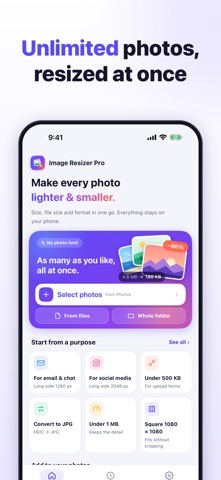

Kort samengevat
Image Resizer Pro: Compress is a photo tool for batch resizing, compressing and converting images on iPhone and iPad. It can compress photos to a target file size such as 500 KB, convert HEIC to JPG, and process photos entirely on the device without uploading them. Its standout feature is that originals are never overwritten, and results are saved as new photos.
Samenvatting door Debuts, gebaseerd op de vermelding in de App Store.Over deze app
Resize, compress and convert many photos at once. Meet a form's "under 500 KB" limit, send pictures by email or chat, or turn HEIC photos into JPG in a few taps. Everything runs on your iPhone or iPad: your photos are never uploaded, and your originals are never overwritten.
■ BATCH RESIZE WITH NO LIMIT • Pick as many photos as you like from Photos, choose images in Files, or take a whole folder, with or without subfolders. • Or start from the Share Sheet with "Resize images".
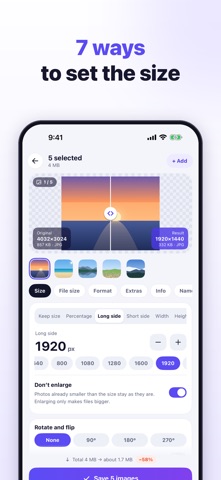
■ 7 WAYS TO SET THE SIZE • Keep size (change only the file size or format), percentage, long side, short side, width, height, or width × height. • For width × height: fit inside keeping the aspect ratio, crop the overflow, stretch, or add margins in any colour. • "Don't enlarge" leaves smaller photos as they are.
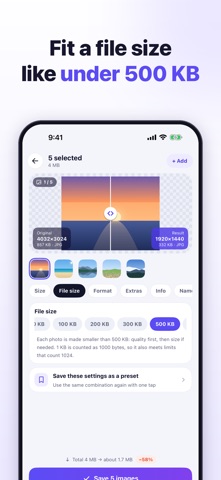
■ COMPRESS TO A TARGET FILE SIZE • Pick 50 KB, 100 KB, 200 KB, 300 KB, 500 KB, 1 MB or 2 MB, or type any KB value. • Quality is lowered automatically, then the dimensions shrink if needed. • 1 KB counts as 1000 bytes, so results also fit sites that count 1024. Photos that miss the target are marked.
■ CONVERT FORMATS • Open HEIC, HEIF, PNG, WebP, GIF (first frame), BMP and more. • Save as JPG (accepted everywhere), PNG (lossless, keeps transparency) or WebP (usually smaller), or keep each photo's format. • Adjust quality with a slider and pick a background colour for transparent PNGs saved as JPG. • If re-saving would make a photo larger, the original is used.
■ NEVER SIDEWAYS The camera's orientation is applied to the pixels, so resized photos stay upright in every app. Rotate by 90°, 180° or 270°, or flip.
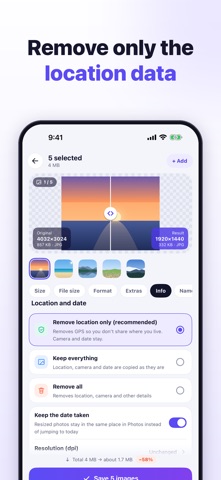
■ LOCATION AND DATE • Remove only the location (recommended), keep everything, or remove everything. • "Keep the date taken" keeps resized photos in the right place in Photos instead of jumping to today. • Print resolution: 72, 96, 150, 300 or 350 dpi.
■ PREVIEW BEFORE SAVING Drag the divider to compare the original and the result, with dimensions, file size and the estimated total saving.
■ ONE-TAP PRESETS Email & chat (1280 px), social media (2048 px), under 500 KB, 200 KB or 1 MB, square 1080 × 1080 (no cropping), websites (1200 px WebP), half size, convert to JPG and photo prints (300 dpi). Save your own presets too.
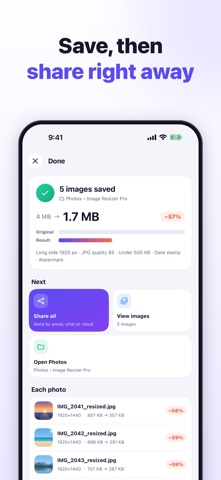
■ SAVING, RESULTS AND HISTORY • Name files original + text, text + original, same name, numbered, or by date taken. • Results are saved as new photos in an album in Photos that you can rename. • Share them all, flip through them, or open Photos from the results screen. • If you like, move the originals to Recently Deleted (restorable for 30 days). • History keeps past batches. On iOS 26 and later, a batch keeps running when you switch apps and a notification tells you when it's done.
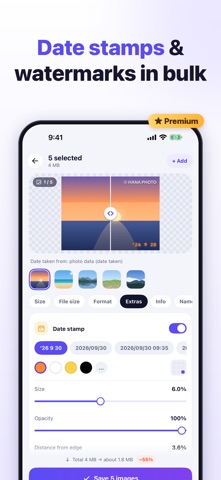
■ PREMIUM (ONE-TIME PURCHASE) A single in-app purchase, not a subscription. "Restore purchase" brings it back on a new device with the same Apple Account. The preview shows Premium effects before you buy. • Date stamp: the date the photo was taken, never today's, found in the photo's data, the file name or Photos, in the camera's local time. 13 formats including a film-camera style, or your own; colour, 9 positions, size, opacity, shadow, outline, band, fonts and text before the date. • Watermark: text (your name, a shop name, several lines) or a logo on every photo, in 9 positions or tiled across it. Adjust size, opacity, angle and margin, with shadow, outline, band and fonts. • Colour themes: Teal, Ember, Violet, Forest and Rose.
Resizing, compression, conversion, unlimited batches, location and date options, presets and history stay free.
Zo beoordelen mensen de app
Log in om deze app te beoordelen. Eerlijk is wat telt.
Nog geen beoordelingen. Heb je de app geprobeerd? Beoordeel hem als eerste.
Meer apps in Foto en video
Beste nieuwe apps in Foto en video van deze week Zoetrope ViewerWatch your zoetrope records and slipmats animate through your camera, or live on your…
 PlanIt Earth: VR Photo PlannerFor landscape, travel, nature, cityscape, night, time-lapse, star-trail, Milky Way and…
 TonalierYour photos now have an editor
 Superblur: Mosaic & Blur FacesSuperblur hides faces, number plates, names and addresses in your photos and videos…
 SqizziKeep the memories
 Shoo: Swipe Photo CleanerThousands of photos and running out of space?