
Embroidly: Image to Embroidery
Não reivindicadaTurn a logo, clip art or a simple flat-color drawing into a machine-embroidery file —…
Por Jhomar Maravillas · Fotografia e vídeoPorque esperamos isto: The honest, detailed description of real stitch digitizing and clear limits makes this a promising niche tool for embroidery hobbyists.


Em resumo
Embroidly: Image to Embroidery turns a logo, clip art or simple flat-color drawing into machine-embroidery files in DST, PES, JEF or EXP format, all on the iPhone or iPad. It is aimed at people who embroider with home or commercial machines and want to preview stitches, hoop size and colors before exporting. It stands out for doing everything on the device, with no account and no upload.
Resumo do Debuts, com base na ficha da App Store.Sobre
Turn a logo, clip art or a simple flat-color drawing into a machine-embroidery file — DST, PES, JEF or EXP — right on your iPhone or iPad.
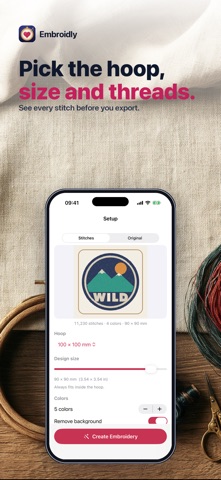
Choose an image and Embroidly digitizes it automatically: it finds the colors, removes the background and turns every shape into real stitches sized for your hoop. You see the whole design stitched before you decide.
• REAL STITCHES — tatami fill for large areas, satin for straight narrow columns (up to 7 mm), underlay and tie-in/tie-off stitches, trims on long jumps. Holes stay open: the middle of an "O" or an "A" is not filled. • HOOP & SIZE — 100×100, 130×180, 160×260 and 200×200 mm hoops or a custom size. The design keeps its proportions and always fits inside the hoop. • COLORS — 1 to 12 thread colors, back to front, one color change per color. Change any thread color before you export. • FILL — fill angle, light / standard / dense density, and an optional running-stitch outline. • SEE IT FIRST — a zoomable stitch preview with stitch count, color changes, trims, size in mm and inches, and estimated sewing time. "Show stitches" draws every needle path and jump. • FILE FORMATS — DST, PES, JEF and EXP, the formats used by most home and commercial embroidery machines. PES and JEF files carry your thread colors as the nearest colors of their own thread charts; DST and EXP store stitches only. • PRIVATE — everything happens on your device. No account, no upload.
Embroidly works best on flat-color logos, clip art, text-like shapes and simple drawings. Photos become flat, poster-style shapes, not photo stitching. Automatic digitizing is not a human digitizer: always test-sew on scrap fabric first, and check the design in your machine's own preview.
Choosing, digitizing and previewing are free. A one-time purchase unlocks exporting the embroidery files.
Questions: overlapmarr@gmail.com
A avaliação das pessoas
Inicia sessão para avaliares esta aplicação. O que conta é seres sincero.
Ainda sem avaliações. Já a experimentaste? Sê o primeiro a avaliar.
Mais apps de Fotografia e vídeo
As melhores apps novas de Fotografia e vídeo desta semana Zoetrope ViewerWatch your zoetrope records and slipmats animate through your camera, or live on your…
 Migumento · QR photo albumOne album for every guest
 SwipeshineSwipeshine turns photo cleanup into one gesture
 Pocket Film: Vintage CameraPocket Film turns your phone into the back of a real film camera
 PlanIt Earth: VR Photo PlannerFor landscape, travel, nature, cityscape, night, time-lapse, star-trail, Milky Way and…
 TonalierYour photos now have an editor